

Maglica
-
Posts
1,223 -
Joined
-
Last visited
-
Days Won
42
Recent Profile Visitors
47,328 profile views




Maglica's Achievements






-
Bättre och snyggare än foliehatt.
-
Truth = Pravda?
-
Location of Molotov and Flamethrower TK's vs Vehicle
Maglica replied to CTABKA's topic in Regelsnack
Tack, men du får driva dina teser själv. -
Location of Molotov and Flamethrower TK's vs Vehicle
Maglica replied to CTABKA's topic in Regelsnack
Jag skulle tro att han uppskattar om du gör honom uppmärksam på eventuella felaktigheter. Möjligheten att uppdatera är ju en fördel med det valda formatet. -
Skulle tro att bilderna ovan är från Linköping. Datumstämpeln indikerar ett senare event.
-
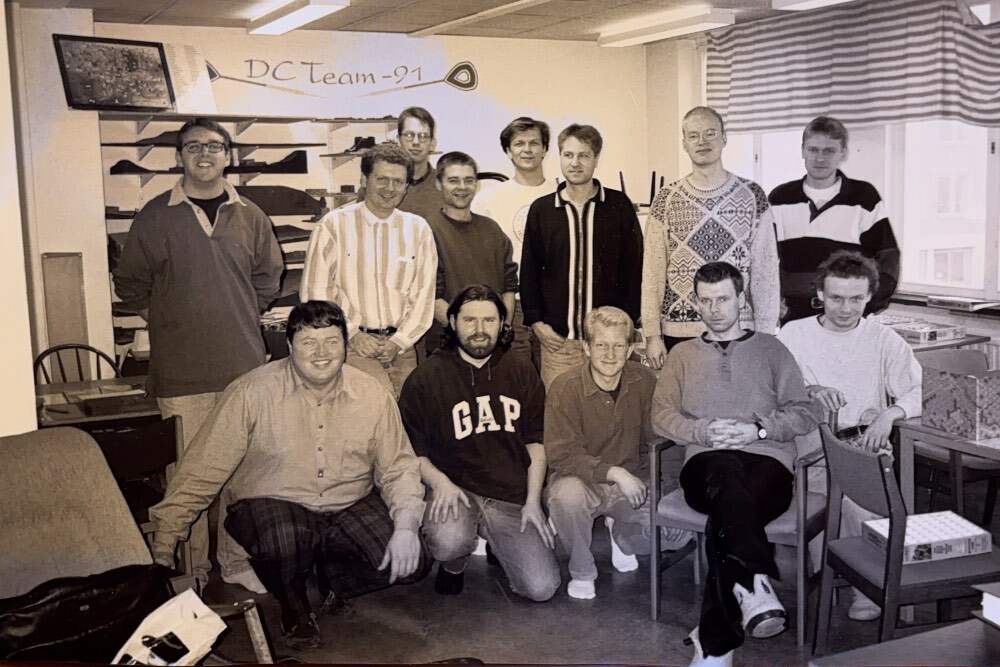
Övre raden: Nils-Gunnar, jag, ?, Klas, Lars, Ola, ?, Martin Undre raden: Bernt, ?, Mattias, Ole, ?
-
Jag fixar 9.
-
En bild från ett gammalt (typ 90-tal) ASL-event i Göteborg. Vem känner ni igen? /Robert
-
Tack för ett trevligt event!
-
Det är moralen som har ett tak, inte kombo med drm.
-
Hittat din foliehatt igen?
-
Concentate on what the rules allow. Fundera alltså inte på att hitta allt som inte är tillåtet.
-
1. Man kan inte hoppa av vagn i advance phase (COWTRA). 2. Om man hoppar av en vagn i "by pass" (när det är tillåtet) hamnar enheten i hexen som är "by-passad". (Som i och för sig inte är en hex bort) 3. Förstår inte frågan. 4. Ja
-
Önskar herrarna en trevlig helg!
-
I det här exemplet är det väl ekvivalent?