Skip to content
View in the app

A better way to browse. Learn more.

ASL Sweden Forum

A full-screen app on your home screen with push notifications, badges and more.

To install this app on iOS and iPadOS
  1. Tap the Share icon in Safari
  2. Scroll the menu and tap Add to Home Screen.
  3. Tap Add in the top-right corner.
To install this app on Android
  1. Tap the 3-dot menu (⋮) in the top-right corner of the browser.
  2. Tap Add to Home screen or Install app.
  3. Confirm by tapping Install.
  • Search By Tags

    Search will match any tag entered
  • Search By Author

Content Type

Forums

  • ASL Sweden
    • ASL Sweden
    • 12R7
    • ASL Social
    • I don't understand swedish
    • Mässen
  • ASL Avdelningar
    • Allmänt
    • Regelsnack
    • Händelser
    • Nyheter
    • Taktiksnack
    • AAR
    • Nybörjare
    • Filarkivet
  • Admin

Calendars

  • ASL-relaterade Händelser!

Find results in

Find results that contain...

Date Created

  • Start

    End

Last Updated

  • Start

    End


Filter by number of...

  • Minimum number of comments

  • Minimum number of replies

  • Minimum number of reviews

  • Minimum number of views

Found 1 result

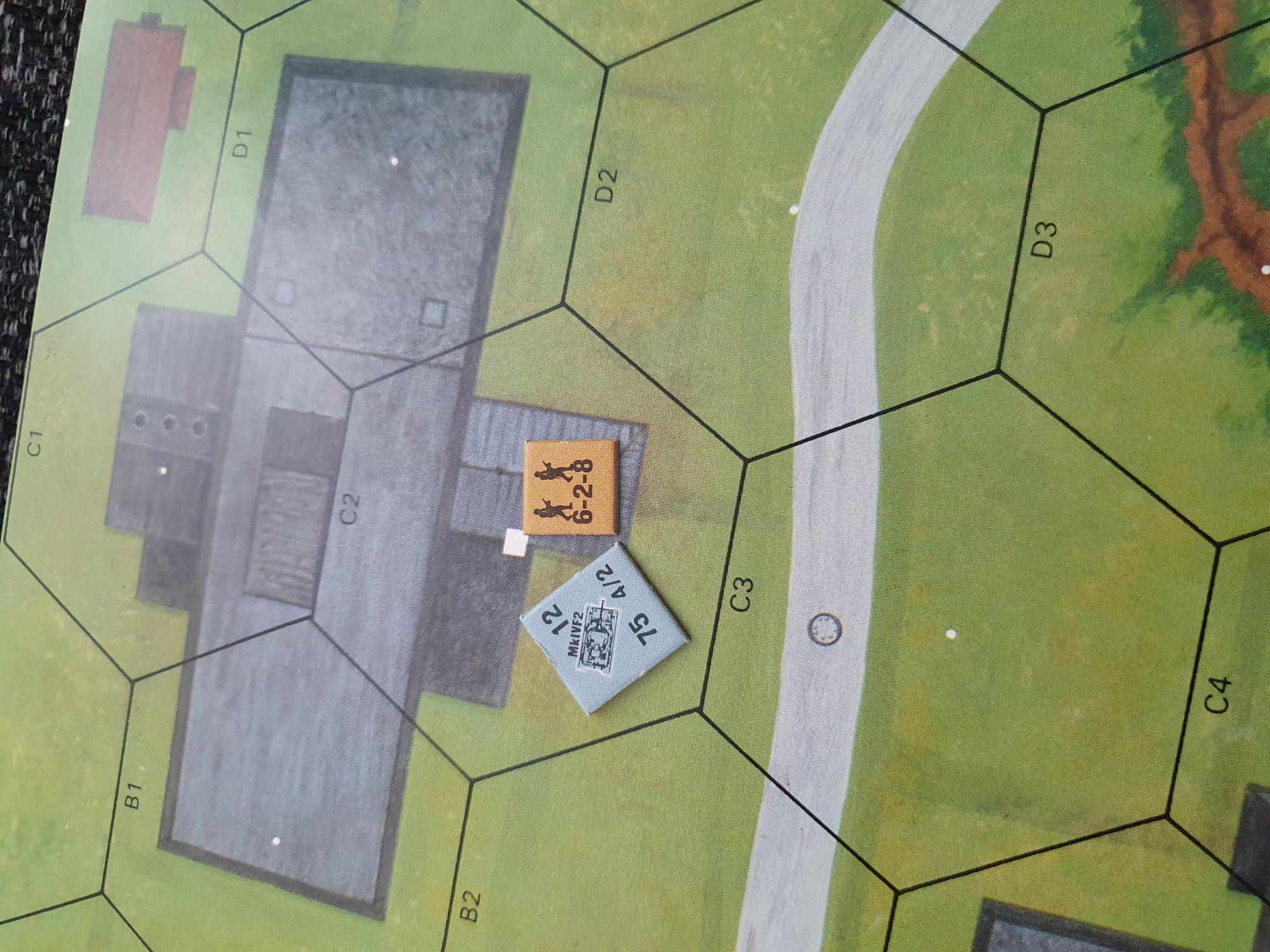
  1. Rule claims that are wrong, from the Journal 12 article: D2.4 MOTION STATUS: .A Vehicle may end its MPh in Motion without expending all of its MP only if it has insufficient MP remaining to enter the next hex it wishes to enter. Rule claims in error: Should the AFV player announce a lower MP expenditure than the total available to the vehicle, the VBM "freeze" is not complete, because the AFV has to spend its entire MP allotment. In other words, its MPh is not over and the vehicle must spend its remaining MP. It may not do so while Non-Stopped (D2.17), so it must either leave the hex, continue bypassing along another hexside, or stop to spend Delay MP. Oavsett om det tyska AFV äntrat hexen med ryska 628 i VMB (2MF) eller rakt in i huset (half MP) så kan man: wish to enter its next hex såsom C1 eller B1 något AFV have insufficient MP to do , därav kan den avsluta its MPh in Motion utan att spendera alla sina MPs.

Account

Navigation

Search

Search

Configure browser push notifications

Chrome (Android)
  1. Tap the lock icon next to the address bar.
  2. Tap Permissions → Notifications.
  3. Adjust your preference.
Chrome (Desktop)
  1. Click the padlock icon in the address bar.
  2. Select Site settings.
  3. Find Notifications and adjust your preference.